Appearance
Manager vs Operator
Complete reference guide for DeskFlow Pro role types and their specific permissions.
Role Types Overview
DeskFlow Pro supports two main role types with different permission levels designed for dealership hierarchy.
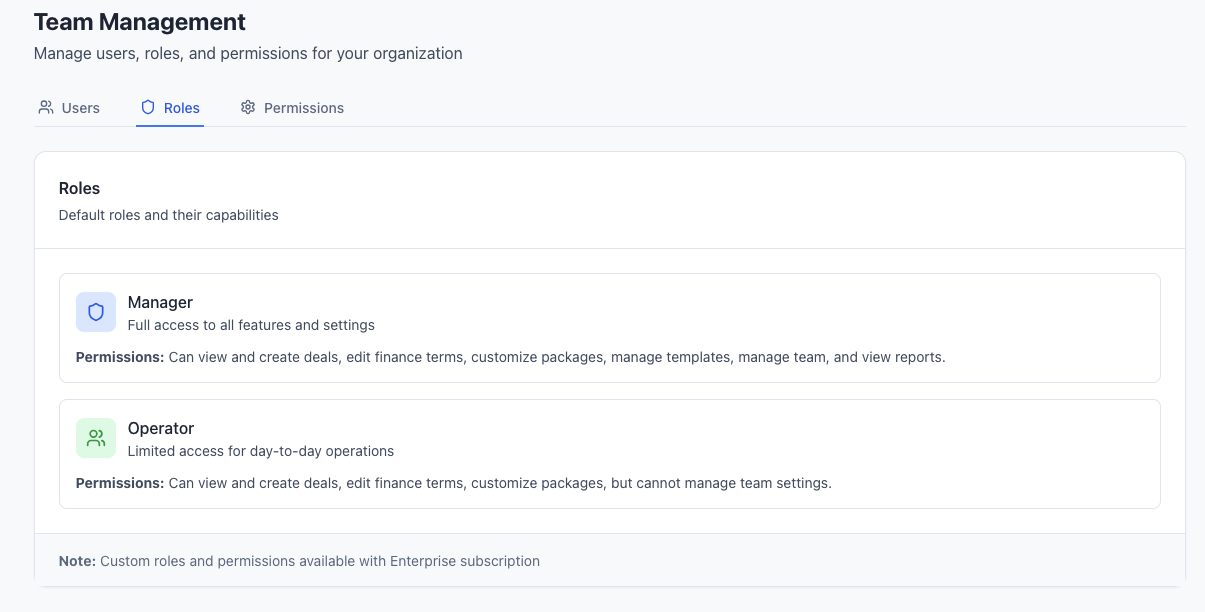
Manager Role
Managers have comprehensive access to all dealership operations and administrative functions:
Deal Management
- View all deals from every team member
- Create and edit their own deals
- Access deal history across the entire dealership
- Generate reports on dealership performance
Team Administration
- Invite new team members via email
- Assign roles to team members (Manager or Operator)
- Remove team members from the dealership
- View team activity and performance metrics
System Configuration
- Access dealership settings and configuration
- Manage subscription and billing information
- Create and edit package templates for the dealership
- Configure default rates and terms
Analytics & Reporting
- View insights and analytics for the entire dealership
- Access operator leaderboards and performance data
- Generate comprehensive reports across all deals
- Monitor dealership KPIs and metrics
Operator Role
Operators have focused access designed for individual sales activities:
Personal Deal Management
- View only their own deals - complete privacy from other operators
- Create and manage personal deals
- Present packages to customers using all presentation features
- Access deal history for their own deals only
Limited System Access
- Cannot view other operators' deals - maintains customer privacy
- No access to team management or administrative functions
- Cannot access billing or subscription information
- Limited settings access - personal preferences only
Personal Analytics
- View personal performance metrics and statistics
- Access own deal insights and conversion rates
- Limited reporting - personal data only
- Cannot view team-wide analytics or leaderboards
Detailed Permission Matrix
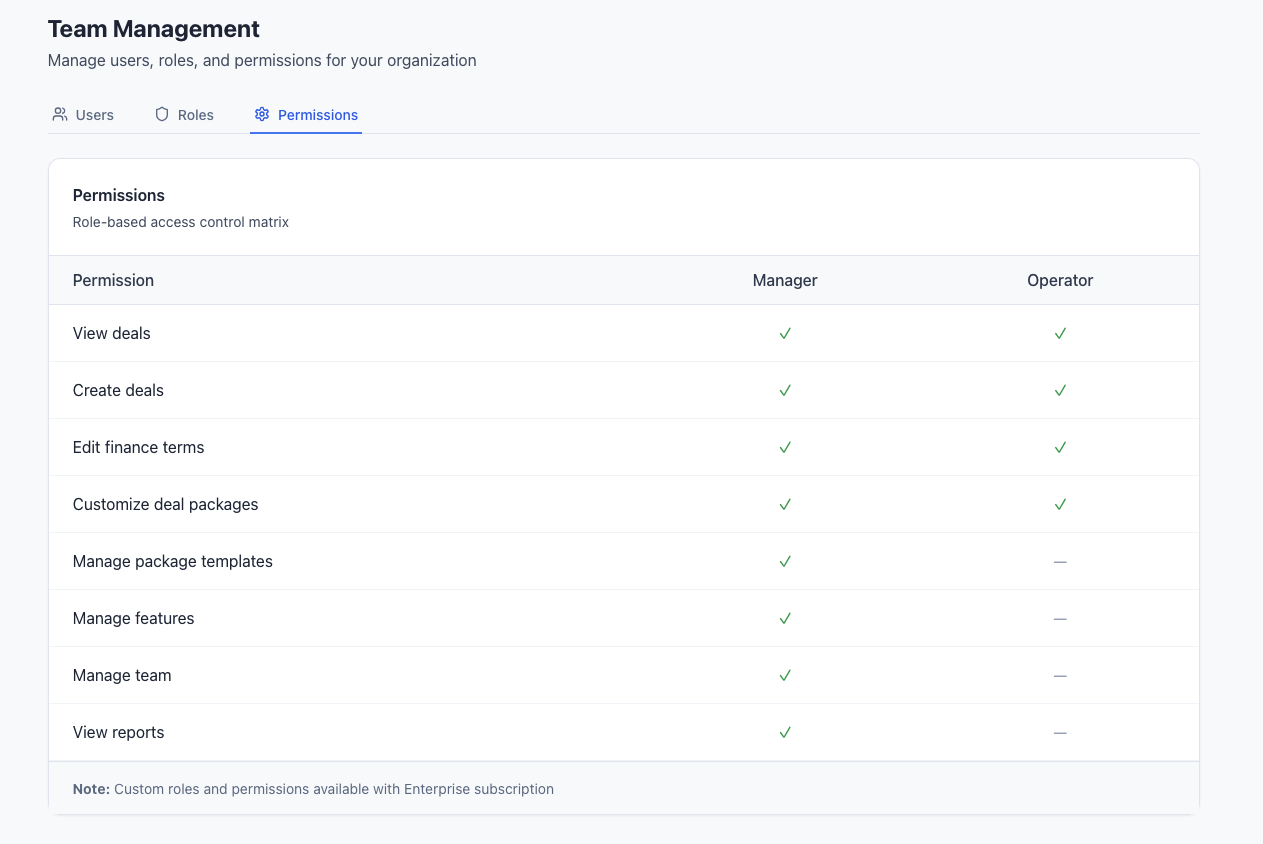
| Feature | Manager | Operator | Notes |
|---|---|---|---|
| Deal Management | |||
| Create Deals | ✅ Yes | ✅ Yes | Both roles can create deals |
| View Own Deals | ✅ Yes | ✅ Yes | Full access to personal deals |
| View All Deals | ✅ Yes | ❌ No | Managers see dealership-wide |
| Edit Any Deal | ✅ Yes | ❌ No | Operators edit own deals only |
| Team Management | |||
| Invite Team Members | ✅ Yes | ❌ No | Manager-only function |
| Manage User Roles | ✅ Yes | ❌ No | Role assignment restricted |
| Remove Team Members | ✅ Yes | ❌ No | Administrative function |
| View Team List | ✅ Yes | ❌ No | Privacy protection |
| System Administration | |||
| Manage Settings | ✅ Yes | ❌ No | Dealership configuration |
| Package Templates | ✅ Yes | ❌ No | Template creation/editing |
| Billing & Subscription | ✅ Yes | ❌ No | Financial information |
| Default Rates/Terms | ✅ Yes | ❌ No | Dealership defaults |
| Analytics & Reporting | |||
| Personal Insights | ✅ Yes | ✅ Yes | Own performance data |
| Dealership Insights | ✅ Yes | ❌ No | Team-wide analytics |
| Operator Leaderboard | ✅ Yes | ❌ No | Team performance comparison |
| Export Reports | ✅ Yes | ❌ No | Data export capabilities |
Security Considerations
Data Privacy
- Operators cannot access other operators' deals - ensures customer privacy and competitive confidentiality
- Manager oversight - Managers can view all deals for quality control and reporting
- Role-based access - System enforces permissions automatically
Administrative Security
- Limited Manager count - Recommend minimal Manager roles for security
- Billing protection - Only Managers can access financial information
- Team management - Prevents unauthorized user invitations or role changes
Operational Benefits
- Clear responsibility - Operators focus on their deals, Managers handle administration
- Performance tracking - Managers can monitor team without operators seeing each other
- Scalable structure - Easy to add operators without administrative overhead
Role Assignment Best Practices
When to Assign Manager Role
- Senior F&I personnel who handle multiple aspects of operations
- Department supervisors who need oversight capabilities
- Business owners who require full system access
- Administrative staff responsible for billing and configuration
When to Assign Operator Role
- Individual salespeople focused on personal deal flow
- New team members until they demonstrate broader needs
- Part-time staff with limited responsibilities
- Temporary or contract personnel
Role Management Strategy
- Start conservative - Begin new users as Operators
- Regular reviews - Assess if role changes are needed
- Document decisions - Track why specific roles were assigned
- Security first - Limit Manager roles to essential personnel
Changing Roles
Role changes take effect immediately and can be performed by any Manager:
- Access team management from the navigation
- Locate the team member in the team list
- Click the role dropdown next to their name
- Select new role (Manager or Operator)
- Confirm the change - Takes effect immediately
Role Change Impact
When changing from Manager to Operator, the user immediately loses access to administrative functions, team data, and billing information.
For more information on managing your team, see Team Management.